西门子 PLC 通讯(四):C# 用 S7.Net 读写 1500
2022 年 9 月 2 日 · 3 分钟读完
用 C# 读写西门子 PLC 存储区里的数据,覆盖常用类型:Bit、Byte、Word、DWord、Int、DInt、Real、LReal、String、WString。只测过 S7-1500,其他系列原理相同。
没有真 PLC 可以先搭仿真:PLCSIM Advanced 或 NetToPLCsim。
S7.Net 的几个函数
源码:S7NetPlus,NuGet 包名 S7netplus。只介绍用到的几个。
创建连接对象
public Plc(CpuType cpu, string ip, short rack, short slot)

public enum CpuType
{
    S7200 = 0, Logo0BA8 = 1, S7200Smart = 2,
    S7300 = 10, S7400 = 20, S71200 = 30, S71500 = 40,
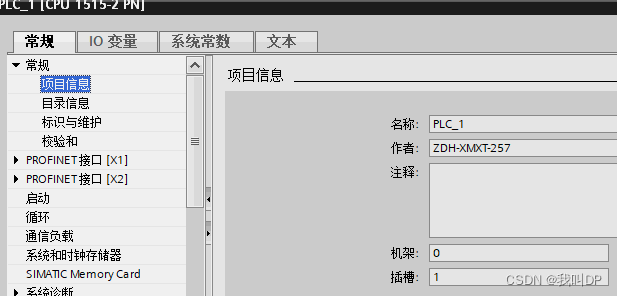
}rack(机架号)和 slot(插槽号)要和 PLC 硬件组态一致:1200 / 1500 一般是 0 / 1(1500 有时是 0 / 0),300 是 0 / 2。
打开和关闭
plc.Open();   // 建立 TCP 连接,完成 COTP 和 S7 通讯握手
plc.Close();
按地址字符串读
object? Read(string variable); // "DB1.DBX0.0"、"DB20.DBD200"、"MB20"、"T45" 等按参数读
object? Read(DataType dataType, int db, int startByteAdr, VarType varType, int varCount, byte bitAdr = 0);

public enum DataType
{
    Input = 129, Output = 130, Memory = 131,
    DataBlock = 132, Timer = 29, Counter = 28
}db:DB 号,DB10.DBW8里的 10;startByteAdr:起始字节,DB10.DBW8里的 8;varCount:连续读几个该类型的值。字符串是特例,见下文。
写
void Write(DataType dataType, int db, int startByteAdr, object value, int bitAdr = -1);value 会按它的 C# 类型自动转换成字节:short 写 2 字节,float 写 4 字节,byte[] 原样写。所以传进去的 C# 类型必须和 PLC 里的类型对应,往 Int 里写一个 int(4 字节)会把后面的变量也覆盖掉。
通讯实例
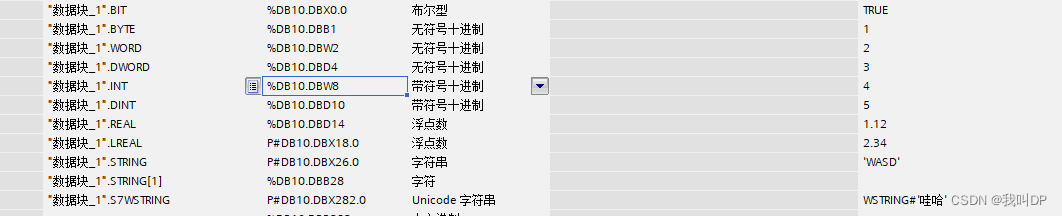
1. PLC 端的数据
DB10,已取消优化访问:
2. 连接
private Plc plc;

private void btn_Connect_Click(object sender, EventArgs e)
{
    plc ??= new Plc(
        (CpuType)Enum.Parse(typeof(CpuType), cmbbx_plcType.Text),
        tb_IP.Text,
        short.Parse(tb_rack.Text),
        short.Parse(tb_slot.Text));

    if (!plc.IsConnected)
    {
        plc.Open();
        btn_Connect.Text = "断开";
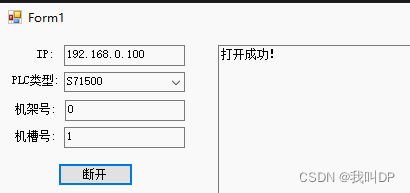
        Log("打开成功");
    }
    else
    {
        plc.Close();
        btn_Connect.Text = "连接";
        Log("连接关闭");
    }
}
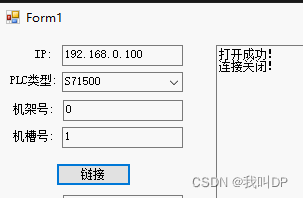
我配置的机架和插槽:
3. 把地址整理成表
record PlcTag(string Address, VarType Type, int Length = 0);

readonly Dictionary<string, PlcTag> tags = new()
{
    ["bit"]     = new("DB10.DBX0.0",   VarType.Bit),
    ["byte"]    = new("DB10.DBB1",     VarType.Byte),
    ["word"]    = new("DB10.DBW2",     VarType.Word),
    ["dword"]   = new("DB10.DBD4",     VarType.DWord),
    ["int"]     = new("DB10.DBW8",     VarType.Int),
    ["dint"]    = new("DB10.DBD10",    VarType.DInt),
    ["real"]    = new("DB10.DBD14",    VarType.Real),
    ["lreal"]   = new("DB10.DBX18.0",  VarType.LReal),
    ["string"]  = new("DB10.DBX26.0",  VarType.S7String, 254),
    ["wstring"] = new("DB10.DBX282.0", VarType.S7WString, 254),
};
Length 是字符串声明时的最大长度。
4. 读
private object? GetValue(PlcTag tag)
{
    if (plc is not { IsConnected: true }) return null;

    // PLCAddress 解析出存储区、DB 号、起始字节、位号。如果你用的版本里它不是 public,
    // 不改源码可以用 DataItem.FromAddress(tag.Address),拿到的字段一样
    var a = new PLCAddress(tag.Address);
    return tag.Type switch
    {
        // 这四种可以直接用地址字符串读
        VarType.Bit or VarType.Byte or VarType.Word or VarType.DWord => plc.Read(tag.Address),
        // 字符串的 varCount 是声明的最大长度,库会自己解析头部、只返回有效字符
        VarType.S7String or VarType.S7WString
            => plc.Read(a.DataType, a.DbNumber, a.StartByte, tag.Type, tag.Length),
        _ => plc.Read(a.DataType, a.DbNumber, a.StartByte, tag.Type, 1),
    };
}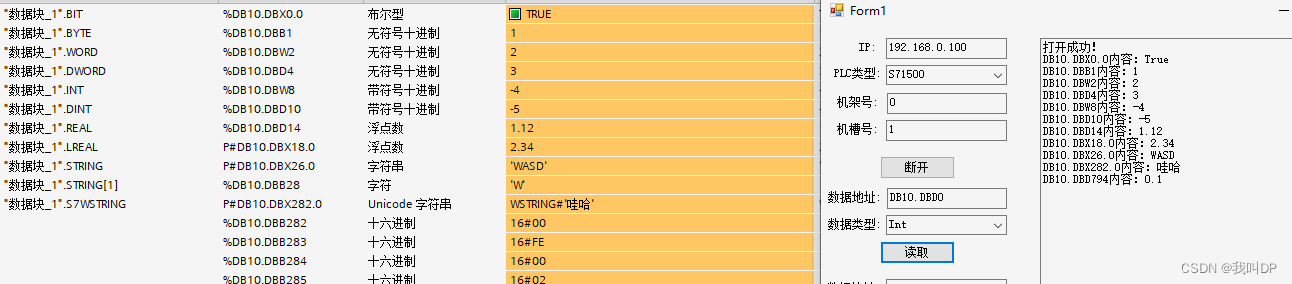
为什么 Bit、Byte、Word、DWord 能直接用地址字符串读? 地址的写法已经说明了长度(DBX 是位、DBB 是字节、DBW 是 2 字节、DBD 是 4 字节),而这四种都是无符号数,不需要额外解释。Int 用 Read("DB10.DBW8") 也能读,但返回的是 ushort,-1 会变成 65535;Real 用 Read("DB10.DBD14") 返回的是 uint,要再用 .ConvertToFloat() 转换。按类型读就没有这些问题。
字符串:String 和 WString 前面有长度头(结构见 第一篇)。原文是先读第 2 个字节拿到实际长度,再读字符,自己拼;用库里的 S7String / S7WString 类型,传最大长度,库会帮你做这些。老的 VarType.String 不解析头部,读回来的是原始字符。
5. 写
private void SetValue(PlcTag tag, object value)
{
    if (plc is not { IsConnected: true }) return;

    var a = new PLCAddress(tag.Address);
    object data = tag.Type switch
    {
        VarType.Bit       => Convert.ToBoolean(value),
        VarType.Byte      => Convert.ToByte(value),
        VarType.Word      => Convert.ToUInt16(value),
        VarType.DWord     => Convert.ToUInt32(value),
        VarType.Int       => Convert.ToInt16(value),
        VarType.DInt      => Convert.ToInt32(value),
        VarType.Real      => Convert.ToSingle(value),
        VarType.LReal     => Convert.ToDouble(value),
        VarType.S7String  => S7String.ToByteArray(value.ToString(), tag.Length),
        VarType.S7WString => S7WString.ToByteArray(value.ToString(), tag.Length),
        _ => throw new NotSupportedException(tag.Type.ToString()),
    };
    plc.Write(a.DataType, a.DbNumber, a.StartByte, data, tag.Type == VarType.Bit ? a.BitNumber : -1);
}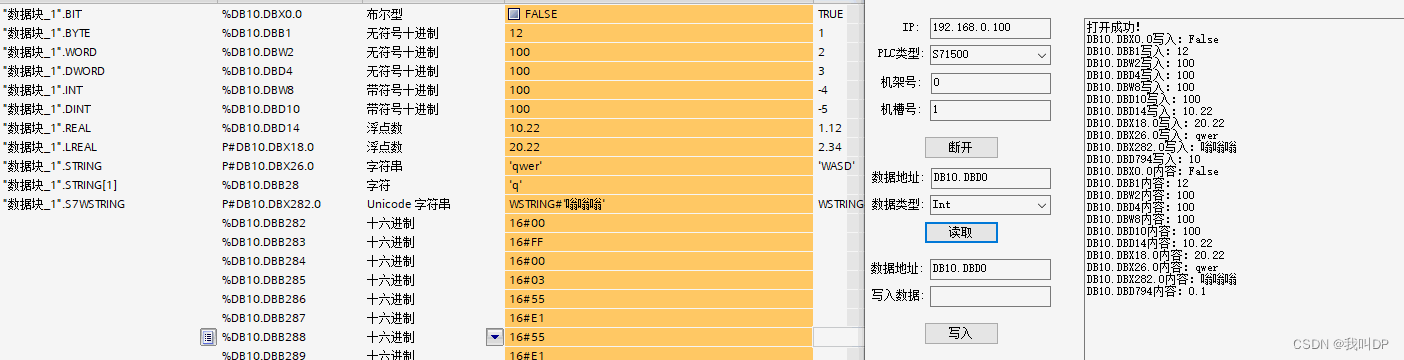
S7String.ToByteArray 生成「最大长度 + 实际长度 + 字符」的完整字节数组;S7WString 会用大端 UTF-16 编码。原文是自己手动拼这些字节,有两处要注意:
- 头部第一个字节是声明的最大长度,原文在长度未知时写了 255,超过了 String 的上限 254,会把 PLC 里的变量写坏。最大长度应该和 DB 里声明的一致,或者干脆跳过它,从
StartByte + 1开始只写实际长度和字符。 - WString 的字符必须用
Encoding.BigEndianUnicode,因为西门子是大端(见 字符编码)。
测试代码和我改过的 S7.Net 源码:下载。
延伸
- 批量读:每次
Read都是一次网络往返(几毫秒)。几十个变量逐个读,一轮就要上百毫秒。连续的变量可以用ReadBytes一次读一整段,再按偏移解析;分散的用ReadMultipleVars,一次请求读多个(单次 PDU 有大小限制,1500 一般是 960 字节)。 - 断线重连:网线松动、PLC 重启后
IsConnected不一定能及时变成 false。读写时 catch 到PlcException或IOException,就Close()后隔几秒重新Open(),不要在异常里死循环重试。 - 线程安全:同一个
Plc对象不要在多个线程里同时读写,响应会串。要么全部放在一个通讯线程里轮询,要么加锁。界面更新再通过Invoke回到界面线程,原因见 WinForm 加载界面卡死。 - 异步版本:新版 S7.Net 提供
OpenAsync、ReadAsync、WriteAsync,配合async/await不会卡界面,用法见 C# 多线程(一):Task。 - 其他选择:Sharp7(Snap7 的 C# 移植,单文件)也很常用;需要访问优化 DB、按符号名读写时,1500 可以开 OPC UA 服务器,用 OPC UA 客户端连。
原文首发于 blog.csdn.net