C# 迭代器(一):IEnumerable 与 IEnumerator
2021 年 9 月 16 日 · 1 分钟读完
写代码时发现,自定义的类只要实现了 IEnumerable 就能被 foreach 遍历;更奇怪的是,把接口声明删掉、只留 GetEnumerator 方法,居然也能用。于是深挖一下。
四个接口
IEnumerable(可迭代的):只有一个方法,返回一个迭代器。
public interface IEnumerable
{
    IEnumerator GetEnumerator();
}IEnumerable<T>:泛型版本,继承了非泛型版本,所以实现类要写两个 GetEnumerator,非泛型那个一般显式实现、藏起来。
public interface IEnumerable<out T> : IEnumerable
{
    IEnumerator<T> GetEnumerator();
}IEnumerator(迭代器):真正干活的,记住当前位置,一步步往后走。
public interface IEnumerator
{
    object Current { get; } // 当前元素
    bool MoveNext();        // 走到下一个,走不动了返回 false
    void Reset();           // 回到第一个元素之前
}IEnumerator<T>:泛型版本,多继承了 IDisposable,所以还要实现 Dispose()。
public interface IEnumerator<out T> : IDisposable, IEnumerator
{
    T Current { get; }
}一句话:IEnumerable 是「能被遍历的东西」,IEnumerator 是「正在遍历的那根手指」。 把两者分开,同一个集合就可以同时被多个 foreach 各自遍历,互不干扰。
手写一个可以 foreach 的集合
class Person
{
    public int Age;
    public Person(int age) => Age = age;
}

class Persons : IEnumerable<Person>
{
    private readonly Person[] _persons;

    public Persons(Person[] persons) => _persons = persons;

    public IEnumerator<Person> GetEnumerator() => new Enumerator(_persons);

    IEnumerator IEnumerable.GetEnumerator() => GetEnumerator();

    class Enumerator : IEnumerator<Person>
    {
        private readonly Person[] _array;
        private int _index = -1; // 从第一个元素之前开始

        public Enumerator(Person[] array) => _array = array;

        public Person Current => _array[_index];
        object IEnumerator.Current => Current;

        public bool MoveNext()
        {
            Console.WriteLine("到 MoveNext 一游");
            _index++;
            return _index < _array.Length;
        }

        public void Reset()
        {
            Console.WriteLine("初始化一下");
            _index = -1;
        }

        public void Dispose() => Console.WriteLine("我悄悄地释放了");
    }
}
原文的迭代器在构造函数里就读了
mArray[0],集合为空时会越界。这里改成从 -1 开始,第一次MoveNext才走到第 0 个,这也是 .NET 自带集合的做法。
使用:
var people = new Persons(new[]
{
    new Person(55), new Person(35), new Person(92),
    new Person(10), new Person(200), new Person(91),
});

int i = 1;
Console.WriteLine("我还没进 foreach");
foreach (var item in people)
{
    Console.WriteLine($"第 {i++} 次进入,{item.Age} 岁人一枚");
}
Console.WriteLine("我出来啦");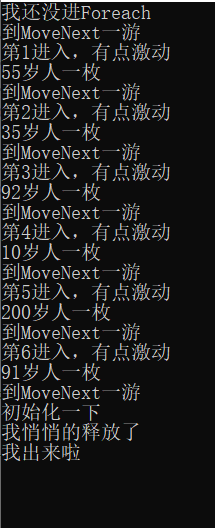
从输出可以看出顺序:先调用一次 GetEnumerator,然后每轮先 MoveNext 再取 Current,MoveNext 返回 false 时退出,最后调用 Dispose。
把 foreach 自己展开
上面的 foreach 等价于:
IEnumerator<Person> e = people.GetEnumerator();
try
{
    while (e.MoveNext())
    {
        var item = e.Current;
        Console.WriteLine($"{item.Age} 岁人一枚");
    }
}
finally
{
    e.Dispose(); // 即使循环里抛异常或 break,也会释放
}
编译器生成的就是这个结构,注意 Dispose 在 finally 里。
延伸
- foreach 是「鸭子类型」:编译器只看有没有一个公开的
GetEnumerator()方法,返回的对象有没有MoveNext()和Current,并不要求实现接口。这就解释了开头「删掉接口也能用」的现象。List<T>正是利用这一点,返回一个 struct 迭代器,遍历时不在堆上分配。C# 9 起,扩展方法形式的GetEnumerator也算数。 Reset基本没人用:很多迭代器(包括yield生成的)调用Reset会直接抛NotSupportedException。想重新遍历,再调一次GetEnumerator就行。- 遍历时改集合会抛异常:
foreach一个List时往里 Add 或 Remove,下一次MoveNext会抛InvalidOperationException: Collection was modified。要删元素,用倒序的for循环或RemoveAll。 - 手写迭代器太累:下一篇的
yield return让编译器替你生成整个Enumerator类。
原文首发于 blog.csdn.net