C# 自定义特性与反射
2022 年 4 月 28 日 · 1 分钟读完
**特性(Attribute)**是贴在代码上的标签,本身不做任何事;**反射(Reflection)**是在运行时读取类型信息的能力。两者合在一起,就能「看标签办事」。概念介绍可以看菜鸟教程的特性和反射。
定义一个特性
[AttributeUsage(AttributeTargets.Property | AttributeTargets.Field |
                AttributeTargets.Method | AttributeTargets.Class,
                AllowMultiple = false, Inherited = true)]
public class CustomAttribute : Attribute // 必须继承 Attribute,名字按惯例以 Attribute 结尾
{
    public string Name { get; }

    public CustomAttribute(string name)
    {
        Name = name;
    }
}
AttributeUsage 规定这个特性能贴在哪里(AttributeTargets)、能不能贴多个(AllowMultiple)、子类能不能继承到(Inherited)。
贴上去
使用时可以省掉结尾的 Attribute,CustomAttribute 写成 [Custom]:
[Custom("类")]
class Machine
{
    public string PropertyNoAttribute { get; set; }

    [Custom("属性")]
    public int Property { get; set; }

    [Custom("字段")]
    public int field;

    [Custom("方法")]
    public void Method() { }
}
用反射读出来
Type type = typeof(Machine);

// 类上的特性
foreach (var item in type.GetCustomAttributes(typeof(CustomAttribute), true))
    Console.WriteLine((item as CustomAttribute)?.Name);

// 字段、属性、方法上的特性
foreach (var item in type.GetFields())
    Console.WriteLine(item.GetCustomAttribute<CustomAttribute>()?.Name);
foreach (var item in type.GetProperties())
    Console.WriteLine(item.GetCustomAttribute<CustomAttribute>()?.Name);
foreach (var item in type.GetMethods())
    Console.WriteLine(item.GetCustomAttribute<CustomAttribute>()?.Name);
?. 的意思是特性不为 null 才取 Name,见 C# 里的各种问号。
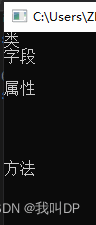
输出里有几行空的:属性那一段的空行来自没贴特性的 PropertyNoAttribute;方法那一段的空行来自属性自动生成的 get_、set_ 方法,以及从 object 继承来的 ToString、Equals 等方法。只想要自己声明的方法,可以加绑定标志:
type.GetMethods(BindingFlags.Public | BindingFlags.Instance | BindingFlags.DeclaredOnly)
    .Where(m => !m.IsSpecialName); // 去掉属性的 get_/set_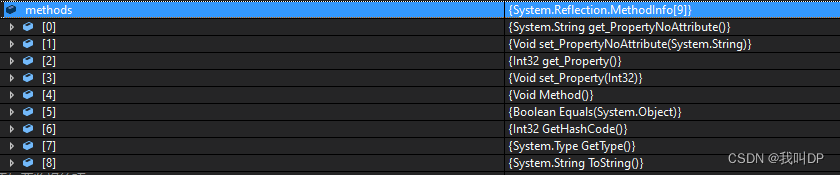
延伸:实际能拿来做什么
- PLC 点表映射:给模型的属性贴上
[PlcAddress("DB1.DBD0")],通讯层反射遍历属性,按地址批量读写,新增一个点位只要加一个属性。 - 表格列名和导出:
[DisplayName("温度")]是框架自带的特性,DataGridView绑定List<T>时会用它做列标题;导出 CSV 时也可以按它取表头。 - 常见的框架特性:
[Serializable]、[Obsolete("用 XX 代替")]、[JsonPropertyName("id")](System.Text.Json)、[Required](数据校验)、[Test](单元测试)都是同一套机制。 - 反射慢,要缓存:
GetProperties()、GetCustomAttribute每次都有开销,在循环或高频通讯里应该只反射一次,把结果存进字典;更快的做法是用表达式树或源生成器(Source Generator)在编译期生成代码,System.Text.Json 和 .NET 8 的 AOT 都在这么做。 - AOT 和裁剪:发布成 Native AOT 或开启裁剪时,反射可能找不到被裁掉的成员,需要用
[DynamicallyAccessedMembers]标注。
原文首发于 blog.csdn.net